When an application is vulnerable to SQL injection and the results of the query are returned within the application's responses, the ==UNION== keyword can be used to retrieve data from other tables within the database. This results in a SQL injection UNION attack.
The ==UNION== keyword lets you execute one or more additional ==SELECT== queries and append the results to the original query. For example:
SELECT a, b FROM table1 UNION SELECT c, d FROM table2
This SQL query will return a single result set with two columns, containing values from columns ==a== and ==b== in ==table1== and columns c and d in table2.
For a ==UNION== query to work, two key requirements must be met:
* The individual queries must return the same number of columns.
* The data types in each column must be compatible between the individual queries.
⠀To carry out a SQL injection UNION attack, you need to ensure that your attack meets these two requirements. This generally involves figuring out:
* How many columns are being returned from the original query?
* Which columns returned from the original query are of a suitable data type to hold the results from the injected query?
Determining the number of columns required in a SQL injection UNION attacks
When performing a SQL injection UNION attack, there are two effective methods to determine how many columns are being returned from the original query.
The first method involves injecting a series of ==ORDER BY== clauses and incrementing the specified column index until an error occurs. For example, assuming the injection point is a quoted string within the ==WHERE== clause of the original query, you would submit:
' ORDER BY 1--
' ORDER BY 2--
' ORDER BY 3--
etc.
This series of payloads modifies the original query to order the results by different columns in the result set. The column in an ==ORDER BY== clause can be specified by its index, so you don't need to know the names of any columns. When the specified column index exceeds the number of actual columns in the result set, the database returns an error, such as:
The ORDER BY position number 3 is out of range of the number of items in the select list.
The application might actually return the database error in its HTTP response, or it might return a generic error, or simply return no results. Provided you can detect some difference in the application's response, you can infer how many columns are being returned from the query.
The second method involves submitting a series of ==UNION== ==SELECT== payloads specifying a different number of null values:
' UNION SELECT NULL--
' UNION SELECT NULL,NULL--
' UNION SELECT NULL,NULL,NULL--
etc.
If the number of nulls does not match the number of columns, the database returns an error, such as:
All queries combined using a UNION, INTERSECT or EXCEPT operator must have an equal number of expressions in their target lists.
Again, the application might actually return this error message, or might just return a generic error or no results. When the number of nulls matches the number of columns, the database returns an additional row in the result set, containing null values in each column. The effect on the resulting HTTP response depends on the application's code. If you are lucky, you will see some additional content within the response, such as an extra row on an HTML table. Otherwise, the null values might trigger a different error, such as a ==NullPointerException==. Worst case, the response might be indistinguishable from that which is caused by an incorrect number of nulls, making this method of determining the column count ineffective.
Note
* The reason for using ==NULL== as the values returned from the injected ==SELECT== query is that the data types in each column must be compatible between the original and the injected queries. Since ==NULL== is convertible to every commonly used data type, using ==NULL== maximizes the chance that the payload will succeed when the column count is correct.
* On Oracle, every ==SELECT== query must use the ==FROM== keyword and specify a valid table. There is a built-in table on Oracle called ==dual== which can be used for this purpose. So the injected queries on Oracle would need to look like:
' UNION SELECT NULL FROM DUAL--
- The payloads described use the double-dash comment sequence ==--== to comment out the remainder of the original query following the injection point. On MySQL, the double-dash sequence must be followed by a space. Alternatively, the hash character ==#== can be used to identify a comment.
For more details of database-specific syntax, see the [[SQL injection cheat sheet]].
Finding columns with a useful data type in a SQL injection UNION attack
The reason for performing a SQL injection UNION attack is to be able to retrieve the results from an injected query. Generally, the interesting data that you want to retrieve will be in string form, so you need to find one or more columns in the original query results whose data type is, or is compatible with, string data.
Having already determined the number of required columns, you can probe each column to test whether it can hold string data by submitting a series of ==UNION SELECT== payloads that place a string value into each column in turn. For example, if the query returns four columns, you would submit:
' UNION SELECT 'a',NULL,NULL,NULL--
' UNION SELECT NULL,'a',NULL,NULL--
' UNION SELECT NULL,NULL,'a',NULL--
' UNION SELECT NULL,NULL,NULL,'a'--
If the data type of a column is not compatible with string data, the injected query will cause a database error, such as:
Conversion failed when converting the varchar value 'a' to data type int.
If an error does not occur, and the application's response contains some additional content including the injected string value, then the relevant column is suitable for retrieving string data.
Using a SQL injection UNION attack to retrieve interesting data
When you have determined the number of columns returned by the original query and found which columns can hold string data, you are in a position to retrieve interesting data.
Suppose that:
* The original query returns two columns, both of which can hold string data.
* The injection point is a quoted string within the ==WHERE== clause.
* The database contains a table called ==users== with the columns ==username== and ==password==.
⠀In this situation, you can retrieve the contents of the ==users== table by submitting the input:
' UNION SELECT username, password FROM users--
Of course, the crucial information needed to perform this attack is that there is a table called ==users== with two columns called ==username== and ==password==. Without this information, you would be left trying to guess the names of tables and columns. In fact, all modern databases provide ways of examining the database structure, to determine what tables and columns it contains.
Read more
* [[Examining the database in SQL injection attacks]]
Retrieving multiple values within a single column
In the preceding example, suppose instead that the query only returns a single column.
You can easily retrieve multiple values together within this single column by concatenating the values together, ideally including a suitable separator to let you distinguish the combined values. For example, on Oracle you could submit the input:
' UNION SELECT username || '~' || password FROM users--
This uses the double-pipe sequence ==||== which is a string concatenation operator on Oracle. The injected query concatenates together the values of the ==username== and ==password== fields, separated by the ==~== character.
The results from the query will let you read all of the usernames and passwords, for example:
...
administrator~s3cure
wiener~peter
carlos~montoya
...
Note that different databases use different syntax to perform string concatenation. For more details, see the SQL injection cheat sheet.
In this section, we'll explain what SQL injection (SQLi) is, describe some common examples, explain how to find and exploit various kinds of SQL injection vulnerabilities, and summarize how to prevent SQL injection.
For a brief resume on all payloads to use for SQL injection testing, try the following cheat sheet:
[[SQL injection cheat sheet|SQL Injection Cheat Sheet !]]
Summary
- [[💉SQL Injection/What is SQL injection (SQLi) ?|What is SQL injection (SQLi) ?]]
- [[💉SQL Injection/What is the impact of a successful SQL injection attack?|What is the impact of a successful SQL injection attack?]]
- [[💉SQL Injection/How to detect SQL injection vulnerabilities|How to detect SQL injection vulnerabilities]]
- [[💉SQL Injection/SQL injection in different parts of the query|SQL injection in different parts of the query]]
- [[💉SQL Injection/SQL injection examples|SQL injection examples]]
- [[💉SQL Injection/Retrieving hidden data|Retrieving hidden data]]
- [[💉SQL Injection/Subverting application logic|Subverting application logic]]
- [[💉SQL Injection/Retrieving data from other database tables|Retrieving data from other database tables]]
- [[💉SQL Injection/Blind SQL injection vulnerabilities|Blind SQL injection vulnerabilities]]
- [[💉SQL Injection/Second-order SQL injection|Second-order SQL injection]]
- [[💉SQL Injection/Examining the database|Examining the database]]
- [[💉SQL Injection/SQL injection in different contexts|SQL injection in different contexts]]
- [[💉SQL Injection/How to prevent SQL injection|How to prevent SQL injection]]
What is SQL injection (SQLi) ?
SQL injection (SQLi) is a web security vulnerability that allows an attacker to interfere with the queries that an application makes to its database. It generally allows an attacker to view data that they are not normally able to retrieve. This might include data belonging to other users, or any other data that the application itself is able to access. In many cases, an attacker can modify or delete this data, causing persistent changes to the application's content or behavior.
In some situations, an attacker can escalate a SQL injection attack to compromise the underlying server or other back-end infrastructure, or perform a denial-of-service attack.
What is SQL Injection
What is the impact of a successful SQL injection attack?
A successful SQL injection attack can result in unauthorized access to sensitive data, such as passwords, credit card details, or personal user information. Many high-profile data breaches in recent years have been the result of SQL injection attacks, leading to reputational damage and regulatory fines. In some cases, an attacker can obtain a persistent backdoor into an organization's systems, leading to a long-term compromise that can go unnoticed for an extended period.
How to detect SQL injection vulnerabilities
The majority of SQL injection vulnerabilities can be found quickly and reliably using Burp Suite's web vulnerability scanner.
SQL injection can be detected manually by using a systematic set of tests against every entry point in the application. This typically involves:
* Submitting the single quote character =='== and looking for errors or other anomalies.
* Submitting some SQL-specific syntax that evaluates to the base (original) value of the entry point, and to a different value, and looking for systematic differences in the resulting application responses.
* Submitting Boolean conditions such as ==OR 1=1== and ==OR 1=2==, and looking for differences in the application's responses.
* Submitting payloads designed to trigger time delays when executed within a SQL query, and looking for differences in the time taken to respond.
* Submitting OAST payloads designed to trigger an out-of-band network interaction when executed within a SQL query, and monitoring for any resulting interactions.
SQL injection in different parts of the query
Most SQL injection vulnerabilities arise within the ==WHERE== clause of a ==SELECT== query. This type of SQL injection is generally well-understood by experienced testers.
But SQL injection vulnerabilities can in principle occur at any location within the query, and within different query types. The most common other locations where SQL injection arises are:
* In ==UPDATE== statements, within the updated values or the ==WHERE== clause.
* In ==INSERT== statements, within the inserted values.
* In ==SELECT== statements, within the table or column name.
* In ==SELECT== statements, within the ==ORDER BY== clause.
SQL injection examples
There are a wide variety of SQL injection vulnerabilities, attacks, and techniques, which arise in different situations. Some common SQL injection examples include:
* Retrieving hidden data, where you can modify a SQL query to return additional results.
* Subverting application logic, where you can change a query to interfere with the application's logic.
* UNION attacks, where you can retrieve data from different database tables.
* Blind SQL injection, where the results of a query you control are not returned in the application's responses.
Retrieving hidden data
Consider a shopping application that displays products in different categories. When the user clicks on the Gifts category, their browser requests the URL:
```
https://insecure-website.com/products?category=Gifts
This causes the application to make a SQL query to retrieve details of the relevant products from the database:
SELECT * FROM products WHERE category = 'Gifts' AND released = 1
This SQL query asks the database to return:
* all details (*)
* from the products table
* where the category is Gifts
* and released is 1.
⠀The restriction ==released = 1== is being used to hide products that are not released. For unreleased products, presumably ==released = 0==.
The application doesn't implement any defenses against SQL injection attacks, so an attacker can construct an attack like:
```
https://insecure-website.com/products?category=Gifts'--
This results in the SQL query:
```sql
SELECT * FROM products WHERE category = 'Gifts'--' AND released = 1
The key thing here is that the double-dash sequence ==--== is a comment indicator in SQL, and means that the rest of the query is interpreted as a comment. This effectively removes the remainder of the query, so it no longer includes ==AND released = 1==. This means that all products are displayed, including unreleased products.
Going further, an attacker can cause the application to display all the products in any category, including categories that they don't know about:
```
https://insecure-website.com/products?category=Gifts'+OR+1=1--
This results in the SQL query:
```sql
SELECT * FROM products WHERE category = 'Gifts' OR 1=1--' AND released = 1
The modified query will return all items where either the category is Gifts, or 1 is equal to 1. Since ==1=1== is always true, the query will return all items.
Warning
Take care when injecting the condition ==OR 1=1== into a SQL query. Although this may be harmless in the initial context you're injecting into, it's common for applications to use data from a single request in multiple different queries. If your condition reaches an ==UPDATE== or ==DELETE== statement, for example, this can result in an accidental loss of data.
Subverting application logic
Consider an application that lets users log in with a username and password. If a user submits the username ==wiener== and the password ==bluecheese==, the application checks the credentials by performing the following SQL query:
SELECT * FROM users WHERE username = 'wiener' AND password = 'bluecheese'
If the query returns the details of a user, then the login is successful. Otherwise, it is rejected.
Here, an attacker can log in as any user without a password simply by using the SQL comment sequence ==--== to remove the password check from the ==WHERE== clause of the query. For example, submitting the username ==administrator'--== and a blank password results in the following query:
SELECT * FROM users WHERE username = 'administrator'--' AND password = ''
This query returns the user whose username is ==administrator== and successfully logs the attacker in as that user.
Retrieving data from other database tables
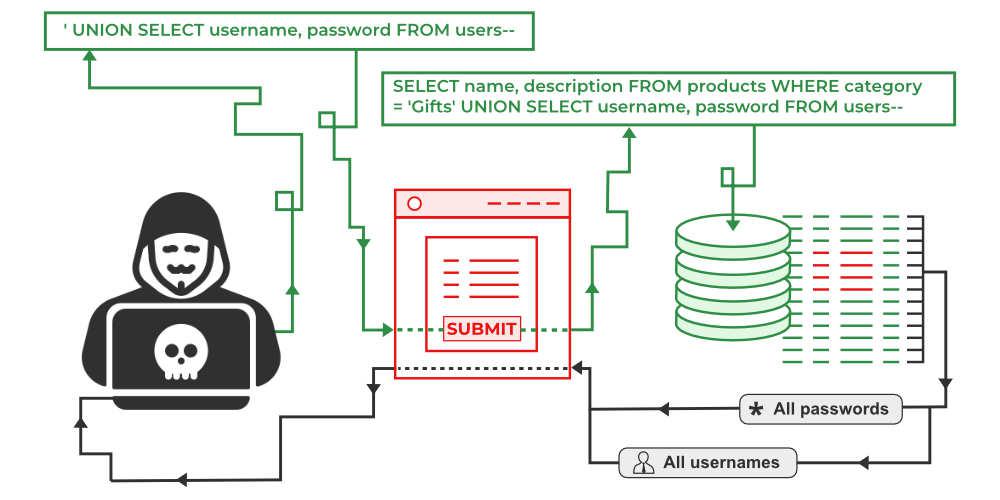
In cases where the results of a SQL query are returned within the application's responses, an attacker can leverage a SQL injection vulnerability to retrieve data from other tables within the database. This is done using the ==UNION== keyword, which lets you execute an additional ==SELECT== query and append the results to the original query.
For example, if an application executes the following query containing the user input "Gifts":
SELECT name, description FROM products WHERE category = 'Gifts'
then an attacker can submit the input:
' UNION SELECT username, password FROM users--
This will cause the application to return all usernames and passwords along with the names and descriptions of products.
Read more
* [[SQL injection UNION attacks]]
Blind SQL injection vulnerabilities
Many instances of SQL injection are blind vulnerabilities. This means that the application does not return the results of the SQL query or the details of any database errors within its responses. Blind vulnerabilities can still be exploited to access unauthorized data, but the techniques involved are generally more complicated and difficult to perform.
Depending on the nature of the vulnerability and the database involved, the following techniques can be used to exploit blind SQL injection vulnerabilities:
* You can change the logic of the query to trigger a detectable difference in the application's response depending on the truth of a single condition. This might involve injecting a new condition into some Boolean logic, or conditionally triggering an error such as a divide-by-zero.
* You can conditionally trigger a time delay in the processing of the query, allowing you to infer the truth of the condition based on the time that the application takes to respond.
* You can trigger an out-of-band network interaction, using OAST techniques. This technique is extremely powerful and works in situations where the other techniques do not. Often, you can directly exfiltrate data via the out-of-band channel, for example by placing the data into a DNS lookup for a domain that you control.
Read more
* Blind SQL injection
Second-order SQL injection
First-order SQL injection arises where the application takes user input from an HTTP request and, in the course of processing that request, incorporates the input into a SQL query in an unsafe way.
In second-order SQL injection (also known as stored SQL injection), the application takes user input from an HTTP request and stores it for future use. This is usually done by placing the input into a database, but no vulnerability arises at the point where the data is stored. Later, when handling a different HTTP request, the application retrieves the stored data and incorporates it into a SQL query in an unsafe way.
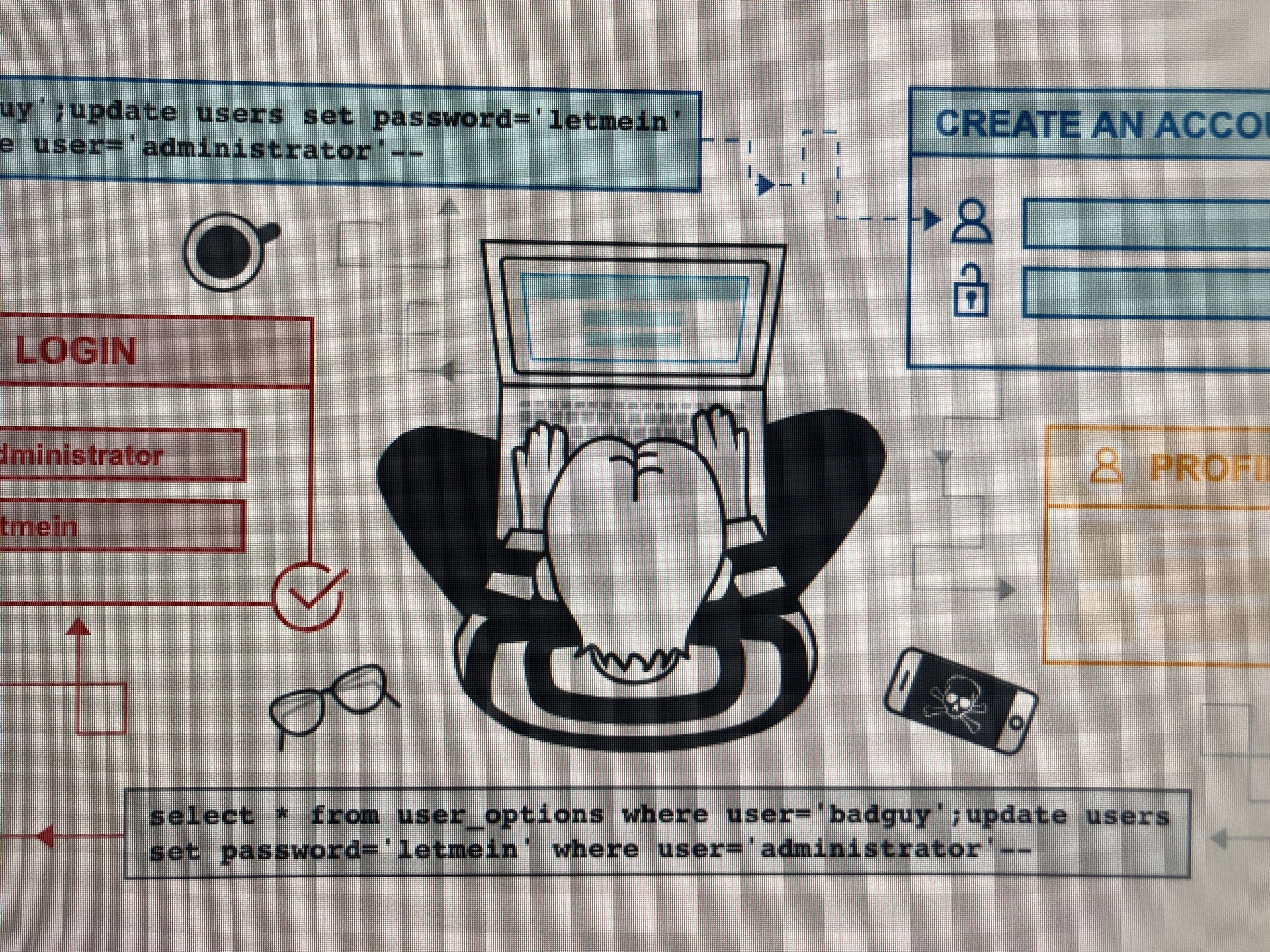
Second-order SQL injection often arises in situations where developers are aware of SQL injection vulnerabilities, and so safely handle the initial placement of the input into the database. When the data is later processed, it is deemed to be safe, since it was previously placed into the database safely. At this point, the data is handled in an unsafe way, because the developer wrongly deems it to be trusted.
Examining the database
Some core features of the SQL language are implemented in the same way across popular database platforms, and so many ways of detecting and exploiting SQL injection vulnerabilities work identically on different types of database.
However, there are also many differences between common databases. These mean that some techniques for detecting and exploiting SQL injection work differently on different platforms. For example:
- Syntax for string concatenation.
- Comments.
- Batched (or stacked) queries.
- Platform-specific APIs.
- Error messages.
Read more
* SQL injection cheat sheet
Following initial identification of a SQL injection vulnerability, it is generally useful to obtain some information about the database itself. This information can often pave the way for further exploitation.
You can query the version details for the database. The way that this is done depends on the database type, so you can infer the database type from whichever technique works. For example, on Oracle you can execute:
You can also determine what database tables exist, and which columns they contain. For example, on most databases you can execute the following query to list the tables:
SELECT * FROM information_schema.tables
Read more
* [[Examining the database in SQL injection attacks]]
* [[SQL injection cheat sheet]]
SQL injection in different contexts
In all of the labs so far, you've used the query string to inject your malicious SQL payload. However, it's important to note that you can perform SQL injection attacks using any controllable input that is processed as a SQL query by the application. For example, some websites take input in JSON or XML format and use this to query the database.
These different formats may even provide alternative ways for you to obfuscate attacks that are otherwise blocked due to WAFs and other defense mechanisms. Weak implementations often just look for common SQL injection keywords within the request, so you may be able to bypass these filters by simply encoding or escaping characters in the prohibited keywords. For example, the following XML-based SQL injection uses an XML escape sequence to encode the ==S== character in ==SELECT==:
<stockCheck>
<productId>
123
</productId>
<storeId>
999 SELECT * FROM information_schema.tables
</storeId>
</stockCheck>
This will be decoded server-side before being passed to the SQL interpreter.
How to prevent SQL injection
Most instances of SQL injection can be prevented by using parameterized queries (also known as prepared statements) instead of string concatenation within the query.
The following code is vulnerable to SQL injection because the user input is concatenated directly into the query:
String query = "SELECT * FROM products WHERE category = '"+ input + "'";
    Statement statement = connection.createStatement();
    ResultSet resultSet = statement.executeQuery(query);
This code can be easily rewritten in a way that prevents the user input from interfering with the query structure:
PreparedStatement statement = connection.prepareStatement("SELECT * FROM products WHERE category = ?");
    statement.setString(1, input);
    ResultSet resultSet = statement.executeQuery();
Parameterized queries can be used for any situation where untrusted input appears as data within the query, including the ==WHERE== clause and values in an ==INSERT== or ==UPDATE== statement. They can't be used to handle untrusted input in other parts of the query, such as table or column names, or the ==ORDER BY== clause. Application functionality that places untrusted data into those parts of the query will need to take a different approach, such as white-listing permitted input values, or using different logic to deliver the required behavior.
For a parameterized query to be effective in preventing SQL injection, the string that is used in the query must always be a hard-coded constant, and must never contain any variable data from any origin. Do not be tempted to decide case-by-case whether an item of data is trusted, and continue using string concatenation within the query for cases that are considered safe. It is all too easy to make mistakes about the possible origin of data, or for changes in other code to violate assumptions about what data is tainted.
Read more
* Find SQL injection vulnerabilities using Burp Suite's web vulnerability scanner